Bars
Insert, delete, copy and repeat whole bars, and set a bar's signatures, repeats and numbers.
Available on iPad, iPhone and Mac.

A bar runs across every track of the score: insert one and every track gets it. Everything you do to whole bars is in one place, the Measure tool.
The Measure tool
The Measure tool (the grid) selects bars instead of notes. Choose it in the tool selector (the first row of the input panel on iPhone), or in View › Tool › Measure.
- TapClick a bar: it is selected on that track, and the toolbar for bars shows at the bottom, headed with its number (Measure 2).
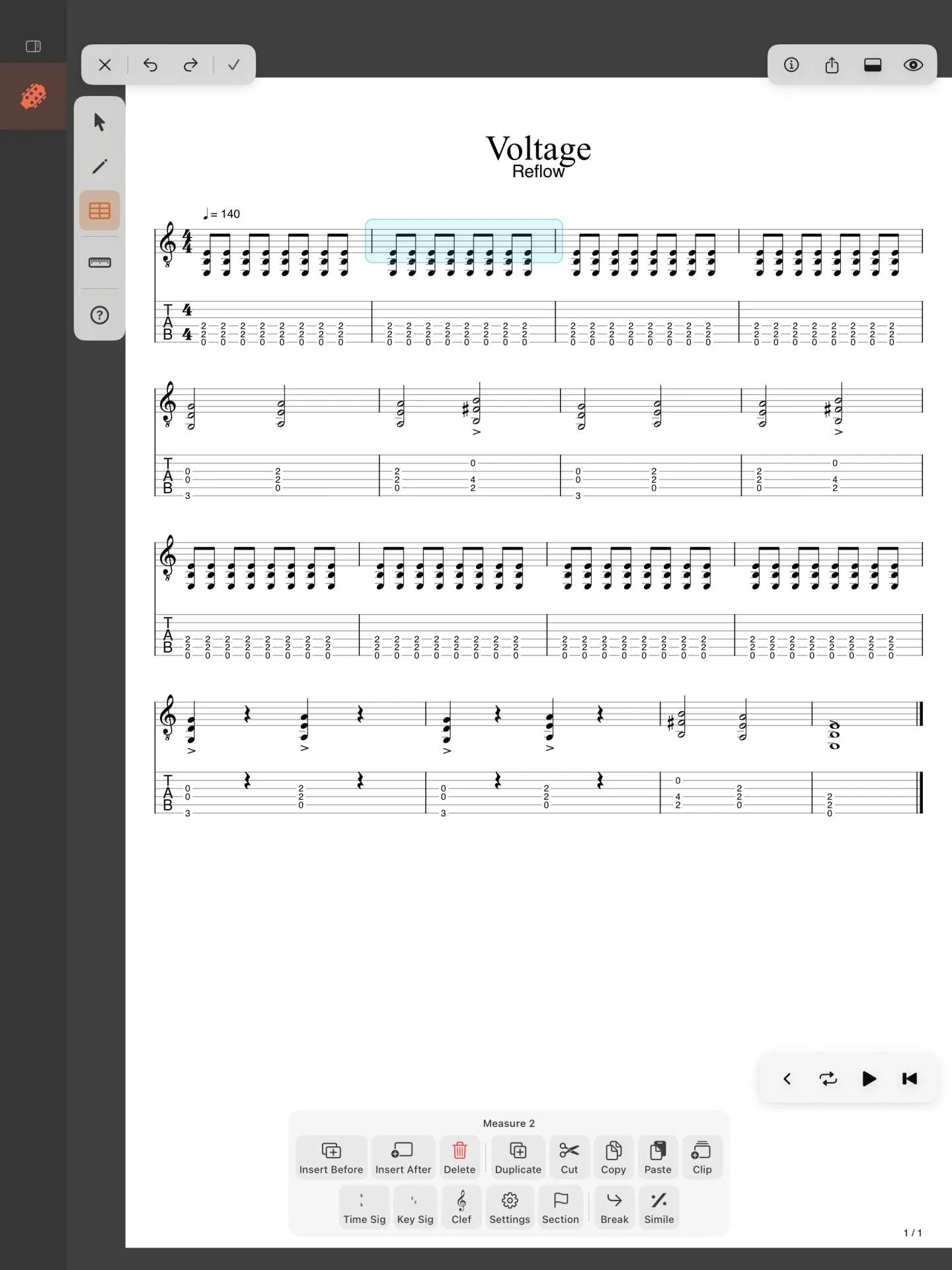
- Touch and hold another bar⇧-click another bar to add it to the selection: the heading says Measures 2–5.
- Choose what to do in the toolbar. TapClick outside the bars to select none.
The toolbar’s buttons, in four groups:
- Insert Before, Insert After, Delete.
- Duplicate, Cut, Copy, Paste, and Clip (a clip from the bars; part of the unlock).
- Time Sig, Key Sig, Clef, Settings, Section.
- Break and Simile.
On iPhone, each group has its own row; on an iPad held upright, two rows.
Inserting and deleting bars
- Insert Before and Insert After add an empty bar before or after the selection, in every track.
- Delete takes the selected bars away, in every track.
- Duplicate adds a copy of the selected bars right after them.
- Cut, Copy and Paste work on whole bars: paste puts the bars you copied at the selected bar.
Writing past the last bar adds one as well: in Edit, moving the cursor right from the score’s last beat makes a new bar.
A bar's signatures and settings
- Time Sig, Key Sig and Clef open their dialogs for the selected bar: the change starts there and holds until the next one. Keys: ⇧T, ⇧K and ⇧C.
- Settings opens Measure Settings: the repeat signs at its start and end and how many times it repeats, its alternate endings, and the segno, coda and D.S. or D.C. jumps it carries.
- Section names the bar as the start of a part of the song (Intro, Verse, Chorus…), shown above it.
- Break starts a new line of the score at the bar. Key: ↩.
- Simile draws the bar as a repeat of the one before, with the % sign.
A lit button (Break, Simile) is on for the selected bar: choose it again to take it off.
Bar numbers
Whether bars are numbered, and how, is in Score Style, under Display (the eye in the top bar › Score Style…View › Score Style…):
- Show Measure Numbers: on or off.
- Frequency: Every System (each line’s first bar), Every Measure, or Every N with its Interval.
- Alignment: over the bar’s First Beat or its Barline.
- First Measure Number: the number the first bar takes, for a score that picks up where another ends.
- Hide Number on First Measure, and Reset Number Positions after you have moved numbers by hand.